
August 5, 2026
If you’ve made the switch to Cloud Voice but still own an analogue handset, you’ll need an analogue telephone adaptor (ATA) to carry on using it.
What's an ATA?
An analogue telephone adaptor (ATA) bridges the gap between traditional analogue systems and modern digital networks. So you can use your current traditional handset on your new digital services.
How does it work?
ATAs work by converting analogy voice signals into digital ones, enabling voice calls over IP networks (VOIP). This means you can keep on using traditional telephone features like caller ID, voicemail and so on.
Setup
When you receive your router, the box will contain:
- RJ11 adaptor
- DSL cable
- Ethernet cable
- DSL filter
- Power cable
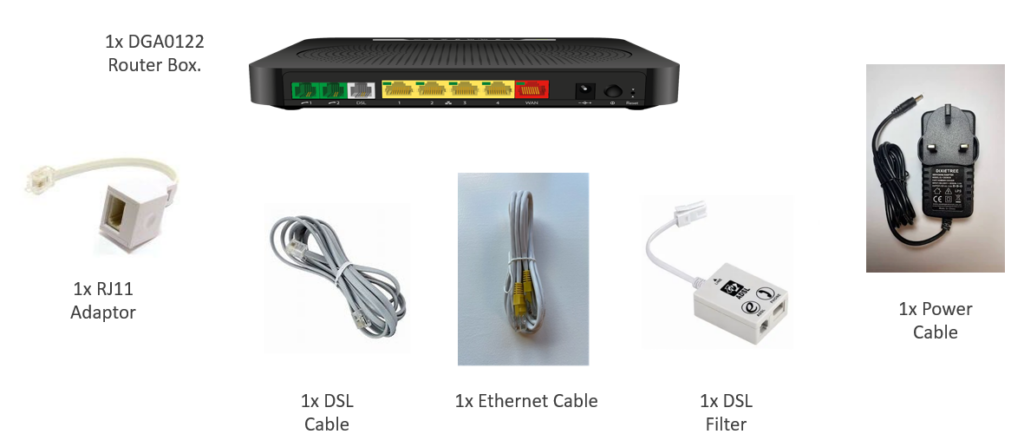
You only need to use an ATA if you don’t have a Cloud Voice handset. Click here to see how to set up your router without an ATA
First, connect your current analogue handset to the RJ11 adaptor.
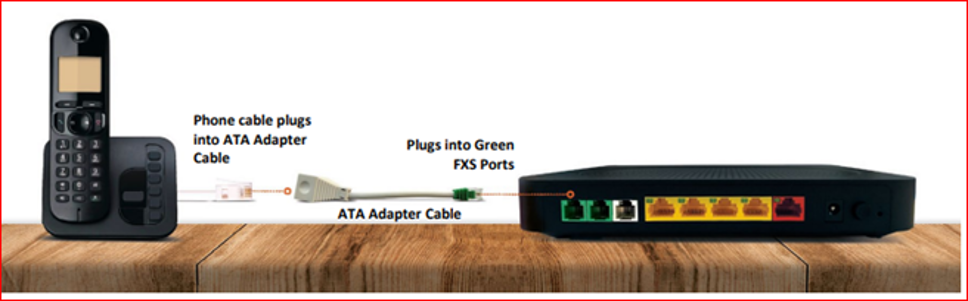
Then connect the clear end of the adaptor into the first green port on your router.
You should then be able to hear a dial tone when you use the handset. If there’s no dial tone, please follow these troubleshooting steps:
- Reboot all the equipment and check your device has signs of power
- Make sure all the cables are correctly seated
- Try the cable in a different switch port
- Check for any red lights on the equipment
- If the cables are correctly seated, you may need to replace the internet and power cables
If the troubleshooting steps do not resolve your issue, please contact our technical support team by calling 03333 200 999. You can also log a ticket via the My Account portal.
